Brian
-
Posts
1,138 -
Joined
-
Last visited
-
Days Won
132
Everything posted by Brian
-
So fed up with Hawk Host after less than one day
Brian replied to my3rdlogin's topic in Customer Reviews
Perfect! If you have any other issues just let us know. Thanks for signing up with us -
Refund or cancellation when not hosting and host setup?
Brian replied to Vu Cong Thuc's topic in Sales Questions
Of course -
So fed up with Hawk Host after less than one day
Brian replied to my3rdlogin's topic in Customer Reviews
Your FTP username/password are indeed the same as your cPanel login details. The cPanel password was included in your "New Account Information" email that you should have received when the account was first setup. If you don't see that email in your inbox please check your junk/spam folder as sometimes they get mistakenly filtered. You can also view your accounts email history through the client area at https://my.hawkhost.com/clientarea.php?action=emails You can always do a cPanel password reset as well. Instructions on how to do that can be found here: https://support.hawkhost.com/index.php?/Knowledgebase/Article/View/47/0/how-can-i-reset-my-cpanel-password If you're still unable to login to FTP after confirming you're using the right cPanel details then it's possible your IP was temporarily blocked by our firewall for multiple failed login attempts. Our support team can remove any IP blocks if that's the case, you would just need to submit a ticket by either emailing support or going through https://my.hawkhost.com/submitticket.php -
So fed up with Hawk Host after less than one day
Brian replied to my3rdlogin's topic in Customer Reviews
Sorry for the issues! You're right in that the client area and cPanel do have separate logins, unfortunately those systems have not been fully merged as far as logins go. With that being said you can fully manage your hosting account through the client area so there is not necessarily a need to login to cPanel directly. That management can be accessed through your client area at https://my.hawkhost.com/clientarea.php?action=services -- once you're on that page click on the service in question and then click 'Management' under the left side 'Actions' menu.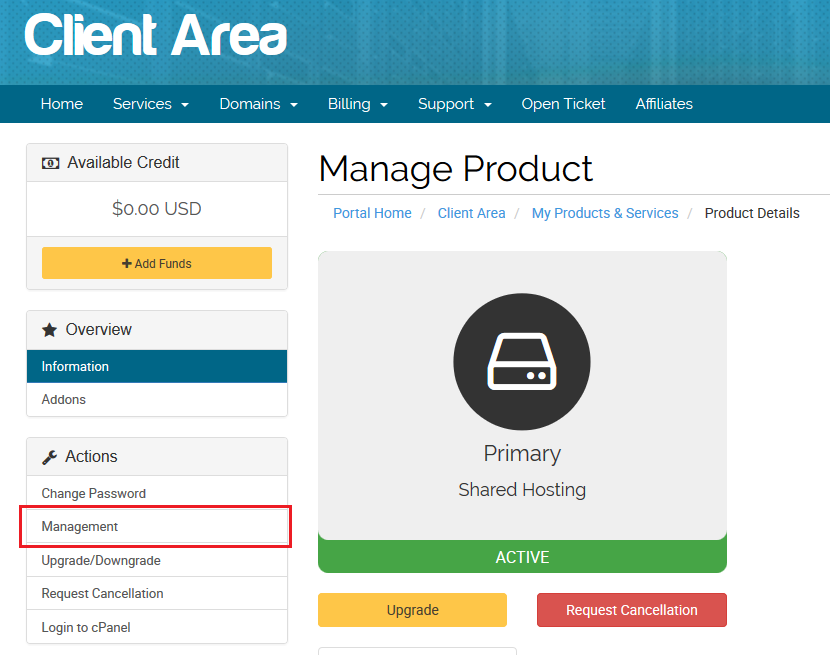
-
Was this issue resolved with our helpdesk team through your ticket? If not please let me know the ticket ID so I can followup and get your site accessible and online
-
Refund or cancellation when not hosting and host setup?
Brian replied to Vu Cong Thuc's topic in Sales Questions
Please request this information in your open ticket with our helpdesk team. This is not information we would publicly post on a forum that other visitors could read. -
Refund or cancellation when not hosting and host setup?
Brian replied to Vu Cong Thuc's topic in Sales Questions
As mentioned in the ticket you posted your refund was processed on our side already. You should contact your bank/card issuer for more details about the status of the refund as it's out of our control at this point. If you need more details about the refund please update your ticket but I can assure you we have no interest in misleading you about the status of us processing your refund. -
Our team can help move your account to a new location. Please submit a ticket at https://support.hawkhost.com with this request and we'll get everything migrated to Singapore for you
-
Our reseller plans include 24/7 support from our team so if you encounter any issues we can certainly attempt to help you figure them out. Even if your issue is outside the scope of our support we can usually advise you on the best way to go about fixing the problem.
-
It's likely you don't have the 'mysqli' extension enabled for the PHP version you're using. You can fix this by logging into cPanel for your account and then search for 'Select PHP Version'. From this interface you can enable/disable PHP extensions and also modify your PHP settings under 'Switch to PHP Settings'.
-
Any account cancellations or billing issues should be taken up with our helpdesk team so they can pull up your account details. If you contact them through https://support.hawkhost.com with your concerns I'm sure we'll be able to figure something out for you
-
Your outbound connections from our server are likely being blocked due to using a non-standard port. If you contact our helpdesk team and give us a list of IPs/hostnames you need to connect to, or the port(s) you need opened, we should be able to whitelist them so you can connect
-
I've opened a ticket on your account and have removed your email from this post just in case it gets picked up by spammers, though how you formatted it you were likely safe anyway
-
Eliminate or lengthen the page timeout for Client Area
Brian replied to tgonhawk1's topic in Suggestions
I'll open a dialogue with our team today about this and see if it's something we're comfortable with. If we did increase the timeout it wouldn't be by a massive amount since at a point there is no reason to keep a session active (especially to the client area) if there is no activity, even more so when you're dealing with potentially sensitive info that is accessible through the client area (name, email, address, domain names, hosting services, etc). I know it's not an ideal solution but if you are writing an extended ticket / issue report using a local notepad might be better than the ticket form directly. Unfortunately the scenario you've described does not come up enough for us to develop/implement a 'Draft' feature for tickets. -
I took a quick look at your site/account and my first request took a bit of time to process. While watching your running processes your W3TC plugin was generating 7~ PHP processes from /plugins/w3-total-cache/pub/minify.php which caused your CPU usage to spike to 100%, so that may be causing the issues you're seeing. I'd recommend reviewing your W3TC settings and possibly disabling the Minify option to see if this helps at all. It's worth noting that once your pages were cached the speed increased significantly so it was just the initial pageload/request I had problems with. I see you've also submitted a ticket for this so we'll follow up there. I think it's best to continue this discussion in that ticket so we can post all relevant details (there are some things we may not want to put in a public forum).
-
Cheers
-
I've replied to your ticket with our helpdesk and it's best to continue the discussion there but it seems you've uploaded your files to the wrong directory which is why you're not seeing them when visiting your website in your browser. As an example I uploaded a demo HTML file to your site which you can access at http://murdercity.xyz/hh.html If you login to your accounts FTP and go to the public_html directory you'll see the file named hh.html. Following this convention if you place your website files in that same directory that hh.html is located in they'll then be accessible via browser.
-
That should be possible to do. Since it's a custom billing term for that service you will need to work with our billing team directly so it's best to open a ticket on our helpdesk at https://support.hawkhost.com -- when submitting the ticket please reference this forum thread so we can make sure the request is approved accordingly
-
Your orders have not passed our initial fraud check so that's why there has been a delay. Please contact our sales team at https://support.hawkhost.com for further assistance.
-
If you haven't already you'll want to follow the steps outlined in your "SSL Certificate Configuration Required" email you received after ordering the cert. This will walk you through the steps of generating your private key, CSR, and then ultimately your SSL certificate. Should you need assistance at any point in the process just submit a ticket with our support team at https://support.hawkhost.com and let us know exactly where you're caught up. We'll be able to get this resolved regardless of the issue
-
Thanks for checking out the affiliate program! The commissions are one time only and not recurring, so the 40% you receive is for the initial sign up price/invoice only. You would not receive a commission for any future renewals from your referred customers.
-
how to migrate from Dedicated Server to VPS
Brian replied to nucklir's topic in Virtual Private Servers
Our sales team should be able to help you figure out if our VPS plans can support a migration from your dedicated server. We'll need to know your minimum resource requirements, what kind of control panel you're using, and any other details you think might be relevant about your current hosting environment. You can submit your ticket through our site at https://www.hawkhost.com/Contact Thank you -
It's likely you're unable to modify your theme once you've changed to RVSkin, certain themes remove the ability to revert through cPanel. If you contact our support/helpdesk team they can switch you back to paper lantern (or any other theme you'd like that we offer).
-
This is an issue that would best be investigated via ticket given the details required and scope of problem. If you've already worked with our support team and aren't satisfied with the answers you've received please just ask for your ticket to be escalated so our level II support team can investigate for you.
-
The emails you're getting are from our automated file scanner which looks for known malware/infections in files you're attempting to upload. As indicated a handful of your files are being detected as malicious or having some malicious code in them. If you contact our support team we can manually review the results from your account to see if it's a false-positive but in most cases the scanner is accurate and the files do actually contain infected code.